
AI document processing
AI document processing for claims, invoices and KYC.
We build systems that read your documents, check them against your rules and send clean data to the systems you already use. A person reviews anything the AI is unsure about.
- Claim forms
- Invoices
- KYC files
- Contracts
- Medical records
- Bank statements
- PDFs
- Scans
- Phone photos
- Email attachments
The problem
Skilled people spend their days retyping documents.
Every claim, invoice and onboarding file arrives as a document that someone has to open, read and key into a system.
The backlog grows faster than the team
Volumes jump at month end and after every busy period, and files wait days before anyone opens them.
Small keying errors become expensive
A wrong amount or a missed field surfaces later as a payment error, a complaint or an audit finding.
Every document looks different
Suppliers, hospitals and customers each use their own layout, so fixed templates break whenever a form changes.
Sensitive files pass through many hands
Identity documents and medical records are emailed, downloaded and re-saved, with no clear record of who saw them.

What it does
From a page in an inbox to checked data in your system.
One pipeline handles the reading, the checking and the hand-off, and keeps your team in charge of the decisions.
Reads any layout
Typed, scanned or photographed pages, tables included, in the layouts your suppliers and customers already use.
- PDFs, scans and phone photos
- Tables and line items
- Multi-page files
Extracts the fields you need
Names, dates, amounts, policy and invoice numbers, returned as structured data.
- Fields defined by you
- Each value linked to its place on the page
- Consistent formats for dates and amounts
Checks against your rules
Totals, tax, dates and limits are tested, and the working is shown for every check.
- Arithmetic and tax checks
- Matching to policies, orders and customers
- Expiry and validity dates
Sends exceptions to a person
Anything that fails a check or looks uncertain goes to a reviewer, with the reason and the source highlighted.
- A review queue with the reason stated
- Approve, correct or reject on one screen
- Corrections recorded to tune the system
Updates your systems
Clean data is written to your claims, finance or onboarding system, and every step is logged.
- API, database or file export
- A full audit trail for each document
- Access controlled by role
Have a document type in mind?
Send us a few samples. We'll show you what the system reads from them and where a person would step in.
Book a demo callHow it works
Watch a document become checked, usable data.
Three sample documents, each read and checked by AI. Choose one, then point at a field to see where on the page it came from.
1The document
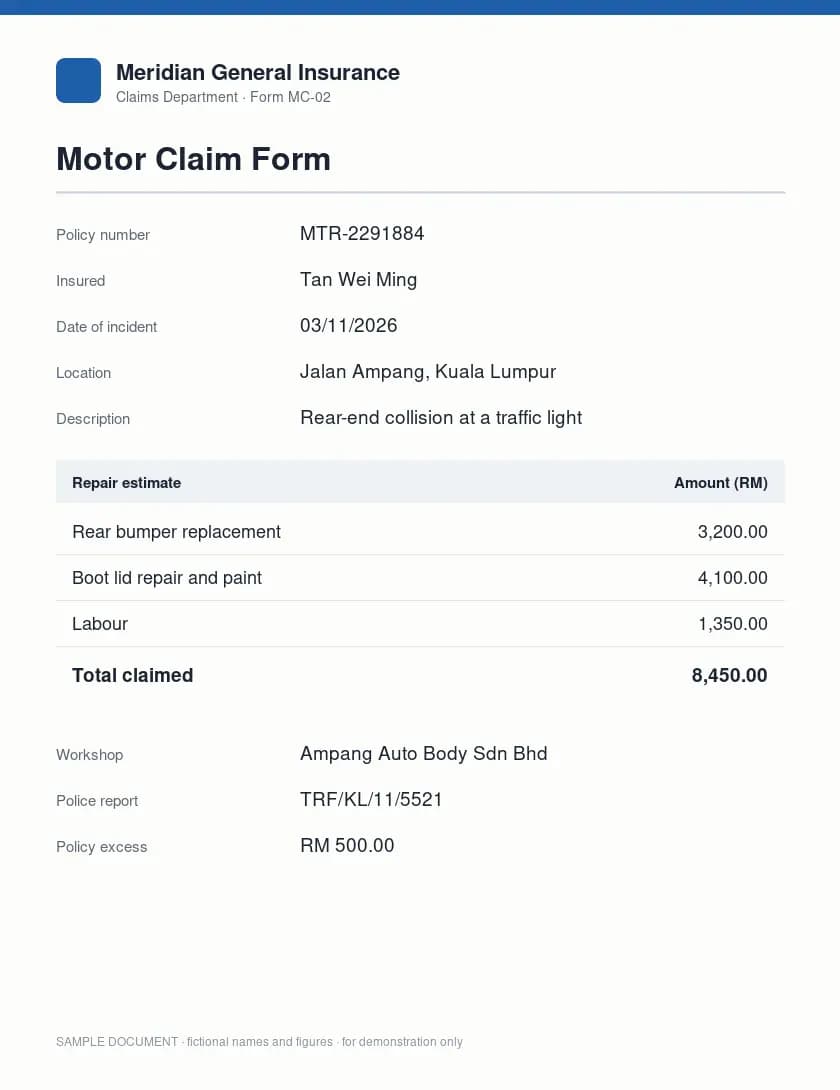
2What the AI readMotor Claim Form
- Policy number
- MTR-2291884
- Insured
- Tan Wei Ming
- Date of incident
- 03/11/2026
- Location
- Jalan Ampang, Kuala Lumpur
- Description
- Rear-end collision at a traffic light
- Rear bumper replacement
- 3,200.00
- Boot lid repair and paint
- 4,100.00
- Labour
- 1,350.00
- Total claimed
- 8,450.00
- Workshop
- Ampang Auto Body Sdn Bhd
- Police report
- TRF/KL/11/5521
- Policy excess
- RM 500.00
3Checks and decisionReading the page
- Line items sum to total claimed3,200 + 4,100 + 1,350 = 8,650, which does not match 8,450
- Payable amount calculation8,450 - 500 = 7,950
- High value claim requires second adjusterClaim 8,450 exceeds 5,000 but no second adjuster is listed
Sent to a person for review
The line items do not add up to the total claimed amount, requiring manual verification.
Read in 2.5 s · checked in 19 s
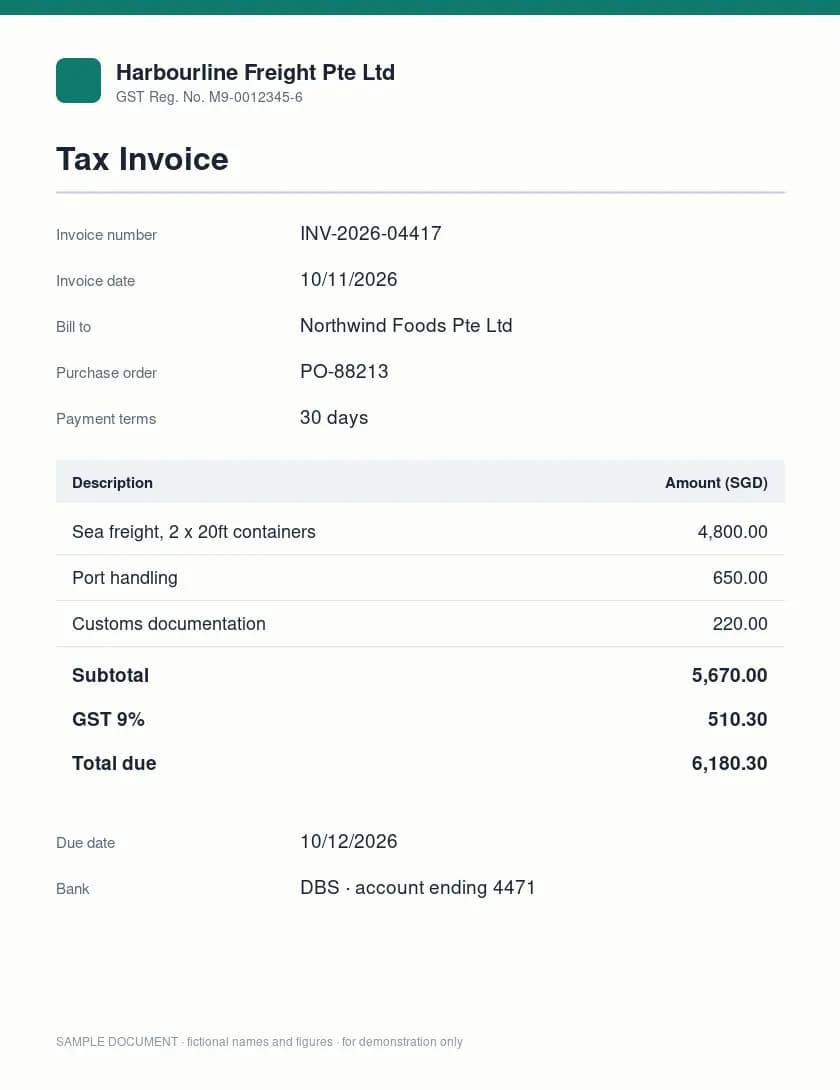
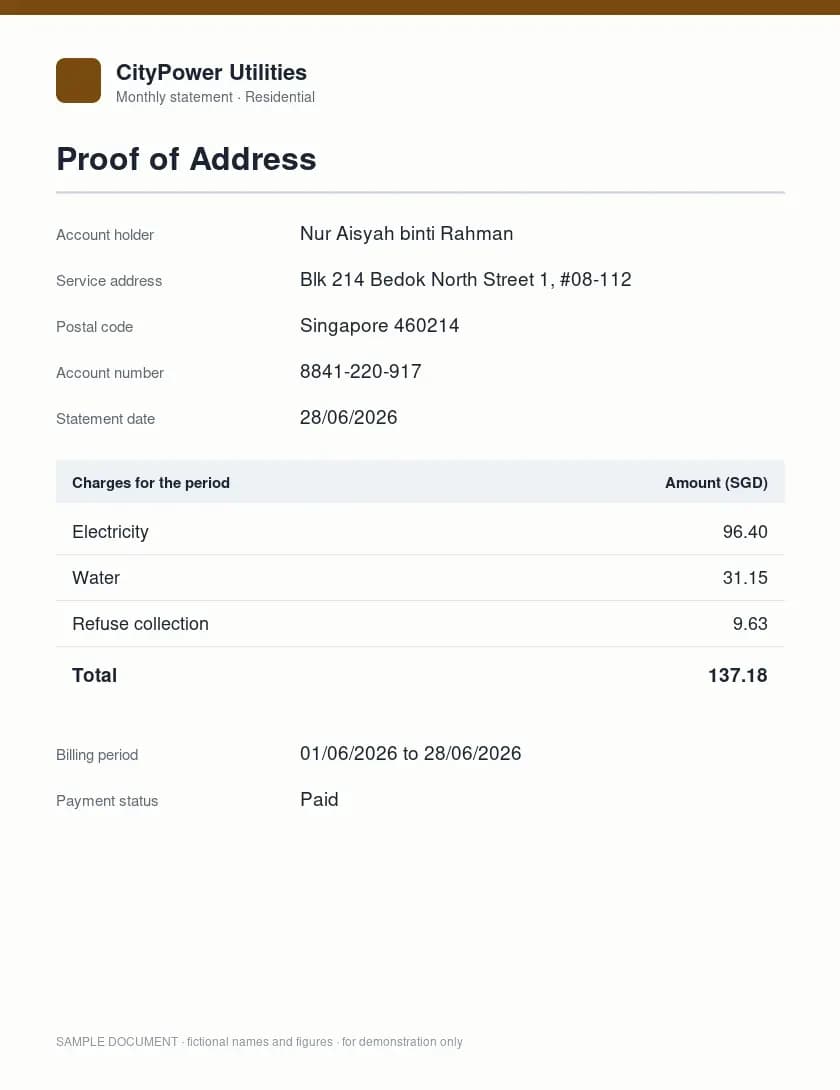
A recorded run on open NVIDIA Nemotron models, replayed faster than real time; the timings shown are the real ones. Sample documents with fictional names and figures.
- 01
Documents arrive
From email, a shared folder, an upload page or the scanner you already have.
- 02
AI reads and extracts
The whole page is read and the fields you defined are pulled out, each tied to its source.
- 03
Rules and checks run
Totals, dates and limits are tested, and values are matched against your records.
- 04
People review, systems update
Clean documents go straight through. The rest go to a reviewer, then into your system.
Use cases by industry
Built around your industry's paperwork.
Each deployment is fitted to the documents, rules and systems of the team that uses it.
Deploy your way
Run it in the cloud or inside your own walls.
The same solution is available both ways. We help you choose based on your data, your regulator and your budget.
Secure cloud
Runs on leading AI models through their business services, inside a cloud region you choose. The fastest and most cost-effective way to start.
- Live in weeks
- No hardware to buy
- Your data is never used to train models
Private or on-premise
Runs entirely on infrastructure you control, in your own data centre or private cloud, NVIDIA-accelerated. Your documents and data stay inside your walls.
- Data stays on your infrastructure
- Open models you can inspect and keep
- Works without an internet connection
Private deployments are built onNVIDIA NIM microservicesNemotron modelsNeMo RetrieverNVIDIA AI Enterprise
How a project runs
From first samples to daily use.
A pilot on one document type proves the result with your own files before you commit to more.
- 01Week 1
Discover
We sit with the team that does the work today, collect real samples and agree what a good result looks like.
- 024 to 6 weeks
Pilot
We build it on one workflow with your own material, and measure it against the way the work is done now.
- 03After sign-off
Deploy
We connect it to your systems, set up access and review steps, and train the people who will use it.
- 04Ongoing
Operate and improve
We monitor quality, handle new cases as they appear and extend it to the next workflow.
Related
Related solutions and services.
- Solution
AI knowledge assistant
Staff questions answered from your policies, SOPs and contracts, with the source cited. - Solution
AI customer service agents
Chat and email agents that resolve common requests and hand over to your team with the full history. - Service
AI automation
The engineering behind our solutions: workflows, integrations and monitoring across your tools.

Book a demo
See it read your own documents.
Send us a few samples and book a call. We'll show you what the system extracts, which checks it runs and where your team would step in.
Book a demo call- Tested on your documents
- A person reviews exceptions
- Cloud or private deployment